Logo

My eID

My eID is the Cayman Islands Government-issued Identification Card.
It is an ID card issued and replaceable on Island.

What is
My eID?

My eID is the Cayman Islands Government-issued Identification Card. It is an ID card issued and replaceable on Island.


My eID improves accessibility and removes barriers for those needing to access essential services, but do not have a method to authentically identify themselves (e.g. through a Government-issued ID). This enables people of all ages to uniquely identify themselves in a multitude of situations.

ID Back

How to
Apply?

My eID is more than just another form of ID. It’s a powerful tool that simplifies the process of proving who you are. 

01
Register your interest
02
Visit the My eID Offices
03
Receive your Identity Card

Why are We Introducing My eID and My Info?

My eID is more than just another form of ID.
It’s a powerful tool that simplifies the process of proving who you are.

Placeholder
Official Proof of Identity for All Ages

My eID is a convenient, easy-to-carry, government-issued identification card that is available to all ages.

Placeholder
Safer In-Person Transactions

My eID significantly enhances privacy and reduces the risk of oversharing by only including essential information on the card. This provides users with peace of mind when needing to identify themselves in person.
Placeholder
Save Time and Costs

With My eID, individuals and businesses can avoid the time and costs of storing and consuming paper.

With My eID, you can experience:

  • Reduced paper costs

  • Automated operations

  • Fewer document errors

  • Digital signatures

How Does It
Work?


My eID will provide you with a Government issued photo ID that acts as proof of identity, and serves as the following:
Proof of identity
Proof of name
Proof of age
Unique ID code
Proof of nationality
Proof of immigration status

What Can it Do?

What Can it Do?
My eID will allow you to:
01
Prove your identity in person or online
02
Share selected information digitally from the Identification Register using the QR code, including your immigration status, and optional details like your address and contact information*
03
Use the MRZ strip on the card by providing your card to be electronically read for more efficient and faster business processes
04
Change your PIN at will to ensure you remain in control of your identity

How to Share Data using
My eID

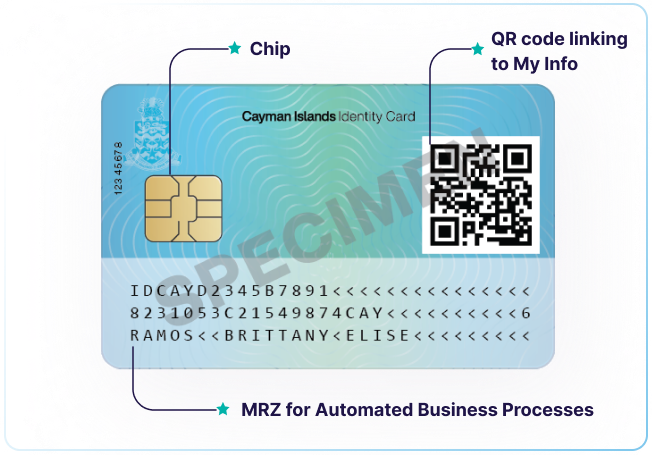
Sharing your information digitally using the eID card is quick and easy*. You can:

  • Choose to share your digital identity using the QR code
  • Tap the physical card on a card reader, using the chip and your corresponding personal PIN code
  • Transfer data via MRZ (Machine Readable Zone) technology, which is read by establishments when you present your ID card
ID Back

Download Software

Download the My eID
Software for MAC or PC or
the App for iOS and Android

Digital
Signatures

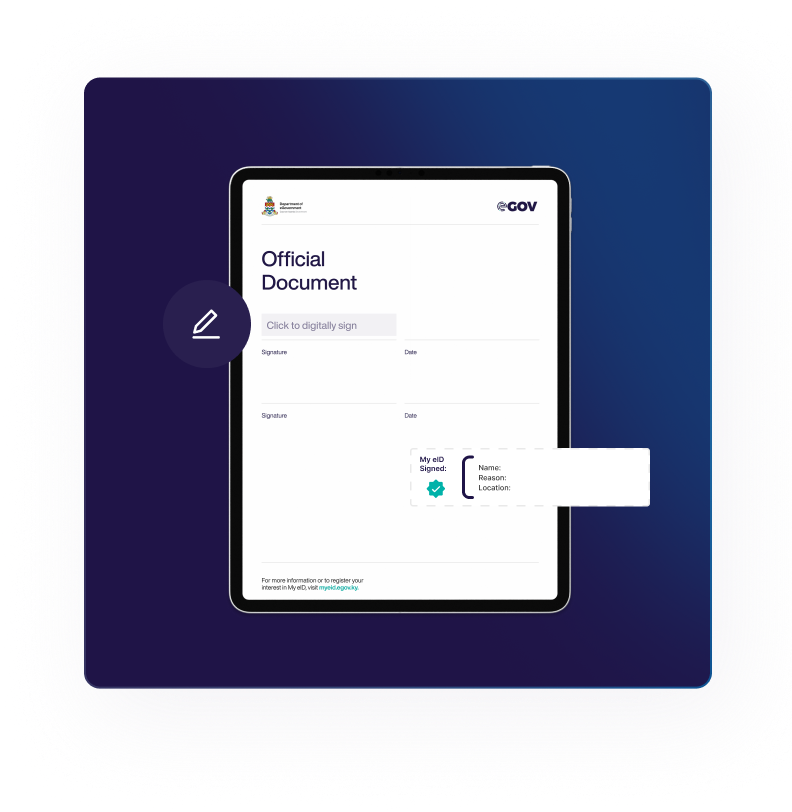
A key feature of My eID is the ability to apply eIDAS compliant, internationally recognised digital signatures to PDF documents, simplifying paper-based processes.

What are the Benefits?

Digital signatures have key advantages:
What Can it Do?
My eID will allow you to:
01
Efficiency: Digital signatures streamline processes, reducing the need to print, sign and scan documents
02
Security: Digital signatures are designed to protect against forgery and tampering, ensuring that both the signature and document remain secure.
03
Legality: Digital signatures on the My eID card are eIDAS compliant and recognised under the Cayman Islands Electronic Transactions Act (2003 Revision).
* Guidance on how to use this feature will be published soon.

User Guides and Videos

Need more support? Check out our detailed user guides and videos.
May 13, 2025

Introducing the Cayman Islands Identification Card

September 23, 2024

My eID - How to Change Your PIN on My eID Mobile App

September 23, 2024

My eID - How to View Your Signed Documents and Verify a Digitally Signed Document on My eID Mobile App

October 7, 2024

My eID - How to Verify That a Digitally Signed Document Has a Valid Digital Signature on PC and Mac

February 1, 2025

My eID - Getting Started with the My eID Card

January 30, 2025

My eID - How to Digitally Sign a PDF Document on PC or Mac Using Adobe Reader and My eID Software

Still can't find

what you’re looking for?

Still can't find

what you're looking for?

Email
General inquiries: myeid@egov.ky
Technical support: eidsupport@egov.ky
My eID Helpdesk
General inquiries: 244-3291
Technical support: 244-3693
Support Website
support.gov.ky
Search Our Help Library
Visit
Support Chat
Chat Now
Open a Support Ticket
Get Started