Card Features - My eID


Card Features
Explore My eID’s range of features designed to simplify the process of
proving your identity.
What are my
Card Features?
Welcome to the future of identification with the Cayman Islands Identification Card:
My eID, the official government-issued identification card of the Cayman Islands. My eID is not just a card; it's a gateway to seamless and secure personal identity management both online and offline. Here's a breakdown of the physical and digital features of the My eID card and how each feature benefits you:
Physical Features:

Government-Issued Proof of Identity:
Legally recognized under the Cayman Islands Identification Card Act, ensuring widespread acceptance and trust.
Comprehensive Identity Details:
Front of the card displays your photo, full name, sex, nationality, date of birth, Cayman immigration status, unique ID code, dates of issue and expiry, and signature.
- Prove Your Identity: Easily prove your name, age, sex, nationality, and immigration status.
- Ensure Wide Acceptance: Accepted at all Cayman Islands Government offices, facilitating your transactions.
- Universal Access: Available to all residents of the Cayman Islands, regardless of age.
Security Features:
Advanced security measures ensure that the card is tamper-proof and authentic, giving you peace of mind that your identity is protected.
Each feature of the My eID card is designed with your security, convenience, and accessibility in mind. Whether you're accessing government services online, proving your identity in person, or digitally, My eID provides a reliable, secure, and user-friendly experience. Embrace the ease of modern identity with My eID – your identity, safeguarded and simplified.
Digital Features:
Digital Signature:
Digitally sign documents using the digital signature certificate on the My eID card along with the My eID mobile app or desktop software. This simplifies processes like completing paperwork or signing contracts.
Enabling Efficient Business Processes:
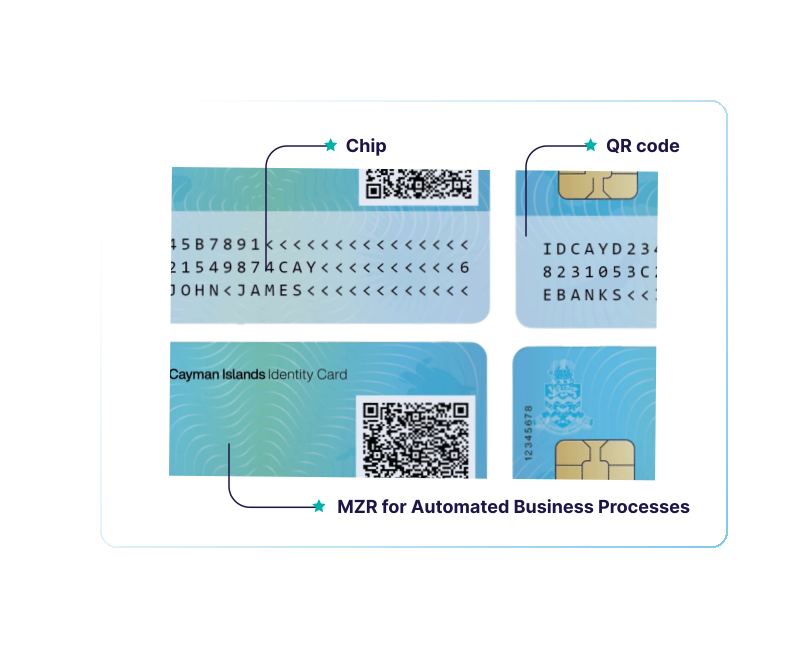
The card’s chip electronically stores all the information printed on the front of the card. This allows the information on the card to be electronically read by utilizing the card’s chip in conjunction with the Machine Readable Zone (MRZ) to speed up identity verification processes in business and government interactions.
QR Code for Digital Identity Access*:
The back of the card has a QR code with a link to your personal digital identity page, My Info. This feature:
- Facilitates Digital Identity Verification: Use your digital identity to access services that require identity verification.
- Enables Identity Sharing: Share your digital identity securely by scanning the QR code on your card or by sending it via email, allowing for convenient proof of identity without the physical card.
* Guidance on how to use this feature will be published soon.